
Protect account from Steam API scam
How Scammers Operate in Steam
- You make a trade on a site/with a friend/or elsewhere
- The real bot from the site or your friend will send you a real trade offer
- Scammers will automatically detect this trade offer and decline it on your account because they have logged into it and have your Steam API key.
- The scam bot will copy the name and avatar from the real bot (account)
- Now the scam bot will send you a trade offer for the same game items you sent to the real bot (account)
- You will open Steam Mobile and confirm the scam trade instead of the real one
What to Do If This Happens to You
- Remove all unknown browser extensions related to Steam/CSGO
- Change the password on your Steam account
- Deactivate devices from using your Steam account here: http://store.steampowered.com/twofactor/manage. This will prevent scammers from automatically logging into your Steam account without a password.
- Go to the Steam API keys page https://steamcommunity.com/dev/apikey and if it looks like this:
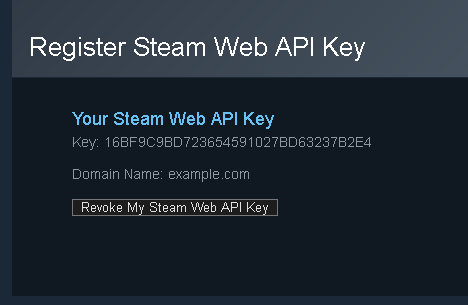
Then you should click “Revoke my Steam Web API key.” Scammers may have obtained your API key and used it to track your trade offers. - Reset your Trade URL in Steam here https://steamcommunity.com/my/tradeoffers/privacy#trade_offer_access_url by clicking the “Create Link” button. If the scammer had access to your account, they would have your Trade URL, allowing them to send you trade offers.
How to Protect Yourself
- Do not install any unpopular browser extensions related to CSGO or Steam.
- When logging into websites related to Steam/CS:GO, make sure you are on the real Steam login page and ensure that the address bar shows steamcommunity.com. If the address bar is hidden, the site is fraudulent. These login pages will look like real Steam login pages, but you are actually providing your account information to a fraudulent site, and they will be able to log into your account even if you have Steam Guard enabled.
- Always open trade offers from the website that sends them to you. If you receive an error message when opening it, your account may have been hacked, and the trade offer was replaced by scammers.
- If the site does not provide a link to the trade offer, make sure the previous trade offer was not declined just before you received a new active trade offer.